I Knew the Problem. AI Helped Me Build the Solution.
How I used Claude Code to build Ronan Launcher around my own workflow, and what the experience taught me about solving problems with AI.


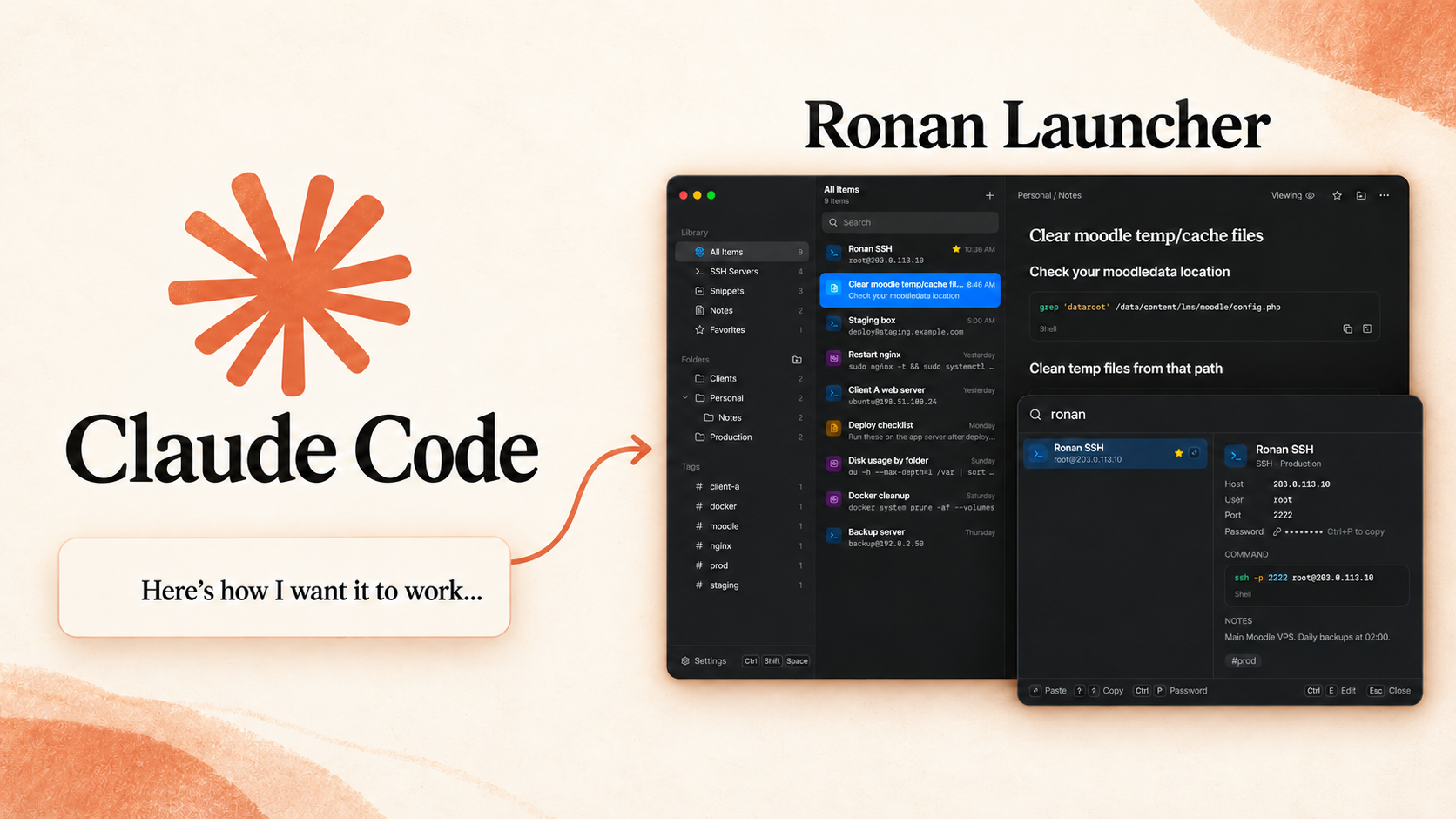
I told Claude Code how I wanted an app to look and work, and we built it.
The idea came from small frustrations in my daily work. I kept searching for things I’d used before, trying to remember commands, and switching between notes. I had gotten used to working around it, but I could picture a simpler way.
So I described what I wanted: what the app should do, how I would use it, and what the design should feel like. That became Ronan Launcher, a desktop application built around my own workflow.
The experience got me thinking: how many everyday problems do we keep putting up with because building our own solution feels out of reach?
A small problem I kept running into
Part of my work involves managing multiple servers. I connect to them through SSH, which lets me access and manage a server remotely.
Sometimes, I would forget which connection belonged to the server I needed. Other times, I knew what I wanted to do but couldn’t remember the exact Linux command or script I had used before.
I wanted somewhere to keep those connections, save working commands, and write notes I could find quickly. Having everything saved was only useful if I could actually find it when I needed it.
That was the starting point for Ronan Launcher.
Explaining what I wanted to Claude Code
My approach started with describing the application I wanted.
I told Claude Code about the design, the workflow, and how things should behave when I used them. I wanted to open the app with a keyboard shortcut, search for something, and quickly use it in the window where I was already working.
I also wanted a separate place to manage my saved connections, commands, and notes, so the quick launcher itself could stay simple.
These details mattered because they described how the application would fit into my day. “Build me a productivity app” would have left a lot open to interpretation. Explaining what I wanted to happen gave the work a clearer direction.
I didn’t have every technical detail figured out beforehand. But I understood the problem well enough to describe what a useful solution would look like.
Claude Code helped turn that into a working application.
What became Ronan Launcher
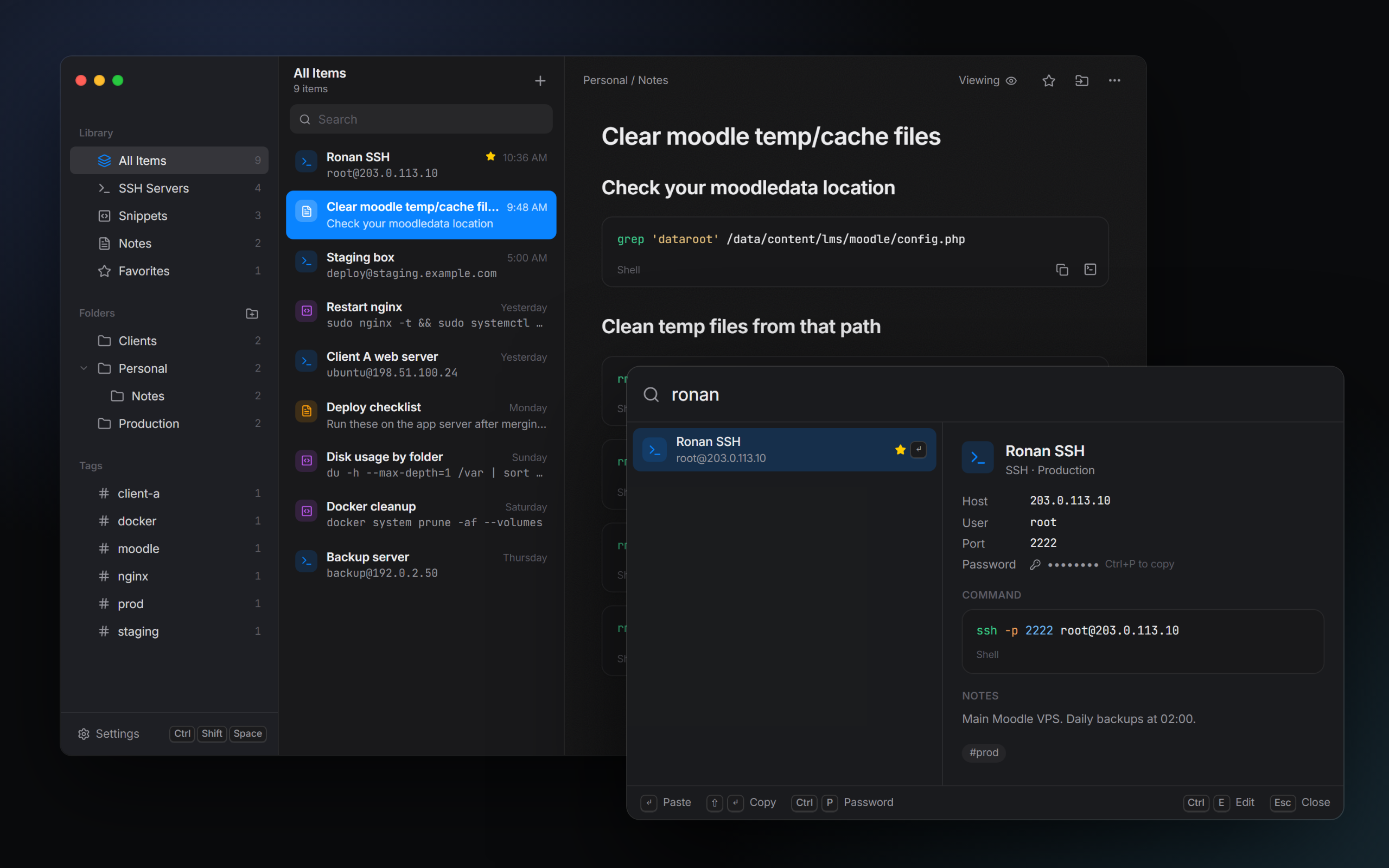
Ronan Launcher is a Windows desktop app that brings SSH connections, reusable commands, and notes into one searchable library.
I can press Ctrl+Shift+Space, search for what I need, and copy or paste a saved command into my existing terminal. Notes can also contain command blocks, keeping instructions and the commands that go with them together.
It’s built with Tauri, React, TypeScript, and Rust. The library is stored locally on the computer.
I had a working version within a day. It was satisfying to see something I’d been thinking about become an application I could actually use.
It also changed how I thought about personal software. An application doesn’t need a huge audience to be worth building. Solving a recurring problem for yourself can be enough.
The part you bring to AI
What helped me get started was knowing what bothered me about my existing workflow.
I could explain what I kept searching for, what I wanted within reach, and how I wanted the application to respond. That gave Claude Code something concrete to work with.
You bring context that AI doesn’t automatically have. It doesn’t know which part of your day is frustrating, which details matter to you, or what would make a result useful in your situation unless you explain them.
You don’t need to arrive with a perfect specification. You can start with a rough description and use the conversation to work through what’s missing.
A few questions can help:
- What keeps happening? Describe the situation you want to improve.
- What would a better outcome look like? Explain what you want to be different.
- What needs to stay true? Include requirements, preferences, and limitations.
- How will you know it works? Think about how you’ll check the result.
You can also tell AI where you’re unsure. Asking it to help you understand the problem is a useful starting point too.
This goes beyond software engineering
You don’t have to be a software engineer to start approaching problems this way.
Being able to explain a problem, describe an outcome, and evaluate what you get back matters across different kinds of work. Those are skills you can practice even if you’ve never built an application.
The technical knowledge still matters when the task calls for it. AI can produce something that looks convincing while missing an important requirement or making a mistake. For software, getting an app to open is only the beginning of checking whether it works properly.
Try the result against what you actually need. Point out what doesn’t work. Give specific feedback and refine it. If something is beyond what you can confidently verify, get help from someone who understands that part.
You don’t need to know everything before starting, but you do need to stay involved.
Start with something you want to improve
Ronan Launcher began with a small inconvenience I kept experiencing. I understood it, described the application I wanted, and used Claude Code to help build it.
That’s what I took away from the experience: understanding a problem gives you a useful place to start with AI.
There may be something in your own day that you’ve gotten used to working around. Take a moment to describe it. Think about what would make it easier and what a useful result would look like.
You might not have the whole solution yet. I didn’t either. But now you have something concrete to work on.
Ronan Launcher is open source on GitHub if you’d like to explore the project.
- Personal
- AI
- Claude Code
- Ronan Launcher
Responses (0)
Likes, saves, and responses are local previews and reset when you leave this page.