


Skip to content
Ronan Dela Cruz
Back to projects

Personal · Windows productivity tool

Ronan Launcher

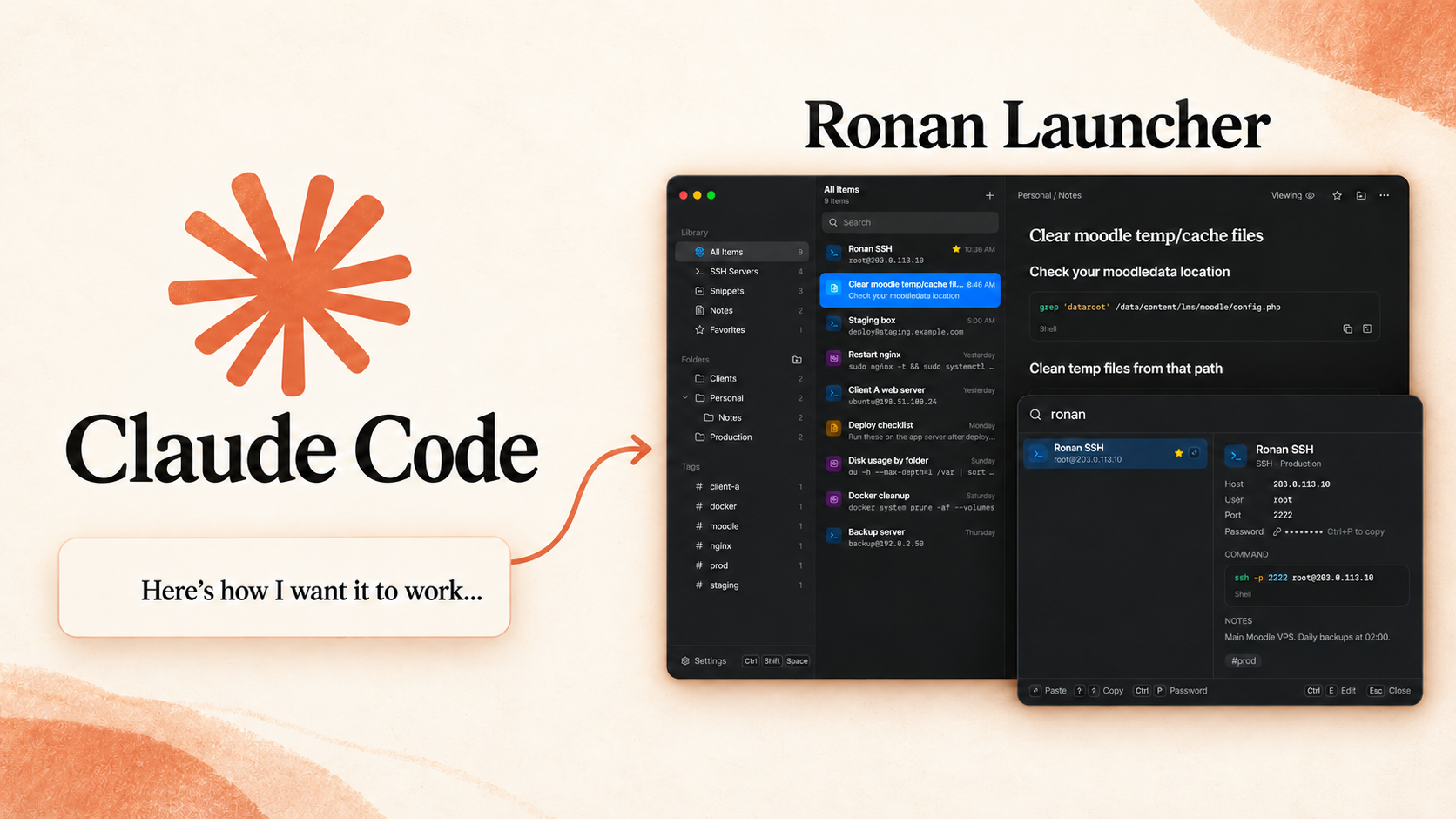
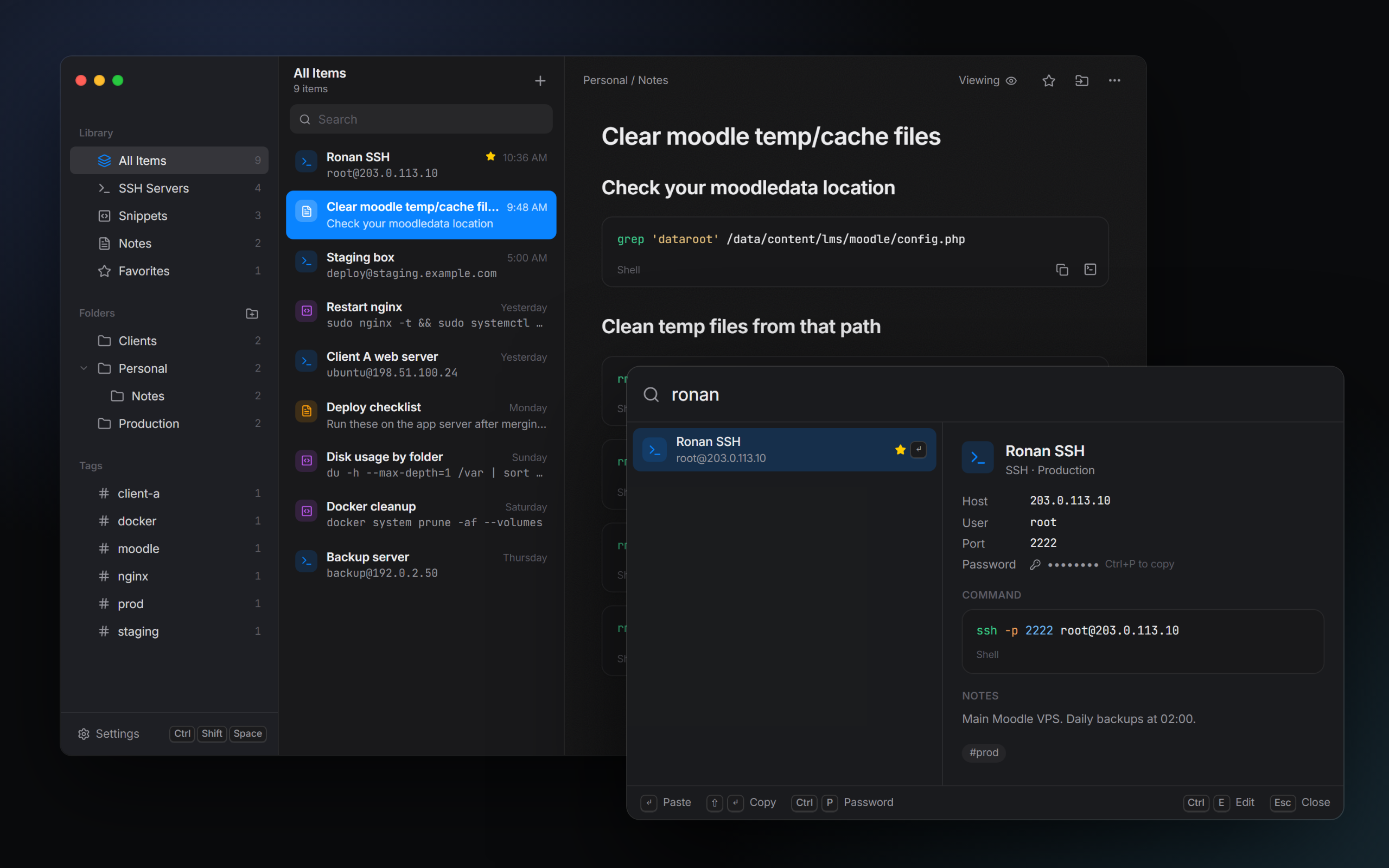
Ronan Launcher with its dark library editor and compact command search window.

Image 1 of 4

Open full-size image (opens in a new tab)

Overview

A Windows tray app I built to keep SSH connections, shell snippets, and runbook notes one shortcut away. Press Ctrl+Shift+Space, search the library, and copy or paste a command into the window you were using. It brings everyday server administration references into a local desktop tool.

A personal, MIT-licensed project for 64-bit Windows 10 and 11. It prepares and pastes commands into existing applications rather than providing its own SSH terminal. The repository links to Windows installer releases.

My contribution

Desktop Application Developer

I built the React and TypeScript interface and the Rust backend with Tauri. My work covered the searchable launcher, library editors, Windows focus and clipboard integration, SQLite storage, password protection, and portable import and export.

Keyboard-first launcher

  • A customizable global shortcut opens a compact launcher while the app stays in the Windows system tray. A separate library window handles editing and organization.
  • Fuse.js searches names, tags, hosts, folder paths, note text, and individual command blocks. Favorites, recent activity, and usage counts influence result ranking.
  • Keyboard actions support pasting, copying without pasting, opening an item in the editor, and drilling into the commands inside a runbook note.

SSH entries, snippets & runbooks

  • SSH entries store a host, user, port, identity-file path, and optional password. Structured fields generate an SSH command, with a custom-command option for other connection details.
  • Snippets hold single commands or multiline scripts with syntax highlighting and supporting notes. Folders, tags, and favorites organize the library.
  • Tiptap provides rich-text runbook editing with headings and code blocks. Each command block has its own Copy and Paste actions and can appear independently in launcher search.

Windows integration

  • Rust tracks the last external window, restores focus, and sends the configured Ctrl+V or Shift+Insert paste shortcut through Windows APIs. The app does not send an Enter keystroke after pasting.
  • Copy-only mode provides a clipboard workflow, and a missing target window falls back to copying. Optional clipboard restoration restores previous text only if the clipboard has not changed in the meantime.
  • Tray controls, single-instance handling, optional startup with Windows, light and dark themes, and Mica/Acrylic window effects integrate the app into the desktop.

Local data & password handling

  • SQLite stores items, folders, settings, and local usage history. Tauri commands connect the React interface to Rust storage and operating-system functions without a hosted backend.
  • Optional saved SSH passwords are encrypted with Windows DPAPI under the current user account. This protection applies to password fields; ordinary library text is stored in the local database.
  • The password-copy action schedules clipboard clearing after 30 seconds and checks that the copied password is still present before clearing it.

Encrypted export & import

  • Password-protected .ronan files package the library for transfer between computers. Argon2id derives the export key, and AES-256-GCM encrypts and authenticates the contents.
  • Merge imports add new entries and prefer newer edits for matching records. Replace imports create a local database backup before replacing the library.
  • Imported passwords are protected again for the destination Windows account, while selected appearance and paste preferences can travel with the export.

Implementation & testing

  • Tauri 2 hosts a React and TypeScript interface built with Vite and Tailwind CSS. Radix UI supplies interface primitives, while Tiptap, Lowlight, and highlight.js support editing and code presentation.
  • Rust uses rusqlite for SQLite persistence, Serde for serialized data, and Windows APIs for focus, input, and DPAPI. The app is packaged as a per-user NSIS installer.
  • The repository includes Vitest checks for search and Markdown command extraction, plus Rust tests for storage, merge and replace behavior, DPAPI round trips, and encrypted-export validation.